

AutoSave Essentials does what it says—it automatically saves (backs up) your essential files by creating a duplicate copy in the safest place you have specified. Save photos, videos, music, documents, and emails—in fact, save anything that is valuable. If you are the person responsible for your family’s memories, your company’s accounts, or even general data, it may just save your life. Plus no complications—it's as easy as 1-2-3!
Your valuable data can be saved locally, on external or remote network drives, or even an FTP site, without any hassle or fuss. AutoSave Essentials works in the background while you are doing other things. Computer people call this process a "backup", otherwise known as saving a copy in a safe place.
Anybody who has a PC with precious data…
For families
In the new digital world, losing any data can be a disaster, whether it’s photos, videos, financial records, or your whole music library. You can't risk losing your valuable memories and digital assets that we all cherish by not protecting them. Want some proof? Pretend your disk drive failed and you lost all the baby photos, the recipes passed down from generations, wills, emails from distant relatives, addresses, invoices…on second thought, don't. That wouldn't be funny even though we would be sure to have a new customer for AutoSave.
For laptop users
When traveling, not only is everything on your laptop at greater risk but your external backup storage is not connected. How does AutoSave work? Your files are always protected because all file modifications are tracked. Just connect to your backup device back at home or to your network, and all your files are automatically saved.
For small businesses
A computer has become an essential tool to run any business. Protecting customer files, emails, and financial records is vital for all companies. But who in a small business has time to back up these important documents? What happens when the person is on vacation? The first question the boss will ask is: "Did you back it up?" With AutoSave, the answer is yes.
How often have we heard people say:
I must remember to back up my music and photos this weekend… or next weekend…
Maybe having anti-virus and firewalls is good enough.
Nothing bad will happen to me, I'm OK.
I think I backed up not so long ago.
The only way I could lose those files is if someone broke into my house and stole my PC.
In fact, 26% of all lost computer data is caused by human error. For example, a friend of mine lost all their favorite internet sites, history, and bookmarks when they upgraded to a new browser version recently. If only he had used AutoSave, he could have taken the 3 steps to restore his data—now there is no excuse when being safe is as easy as 1-2-3!
You save it once and AutoSave will back it up automatically.
AutoSave Essentials in 5 points:
1. Once the installation is completed, your data is immediately ready to be saved.
2. Over 90% of backup plans are completed automatically.
3. NO technical knowledge is needed. You want to back up photos? AutoSave Essentials finds them for you.
4. Integrated intelligence—you are protected in all situations and at all times, whether at home, in the office, or traveling.
5. AutoSave Essentials runs in the background, automatically protecting your data while you work. No need to remember to backup—AutoSave handles this automatically.
mysoftware13's SmartBackup technology
AutoSave Essentials uses mysoftware13's SmartBackup technology to protect your data.
Example 1: When traveling, your external backup storage is not connected. How does AutoSave work? 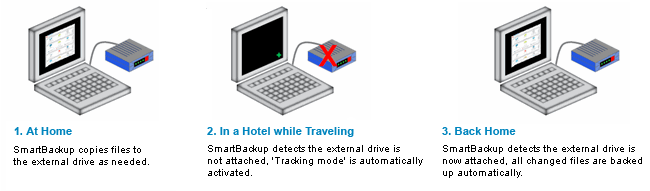
Your files are always protected because all file modifications are tracked. Just connect to your backup
device back at home or to your network, and all your files are automatically saved.
Example 2: Laptop is running on battery. Concerned about your PC's battery life? 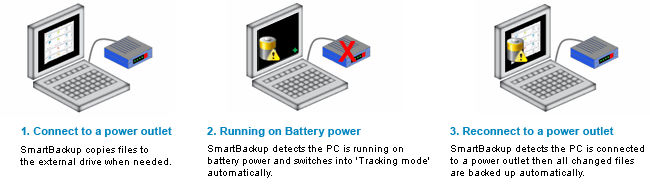
When running on battery, AutoSave Essentials automatically switches to tracking mode to maximize battery life. When you connect to a power outlet, your files will be automatically saved.
1. Setup: what you want to save, where you want to save it. 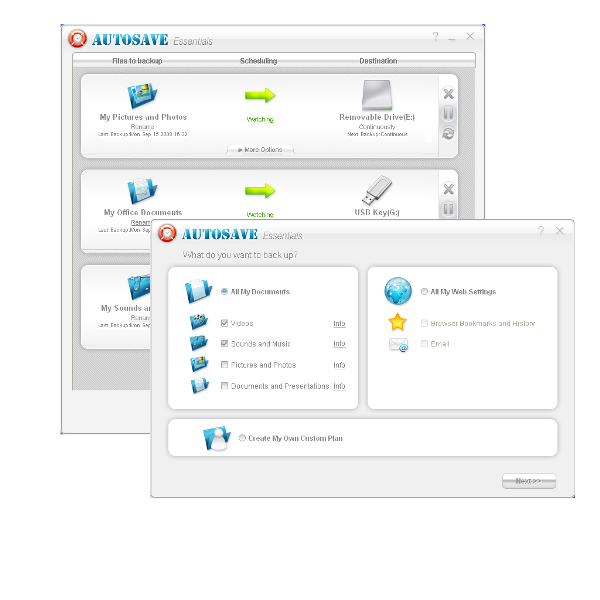
2. Save it: AutoSave automatically creates duplicate copies as frequently as you want. 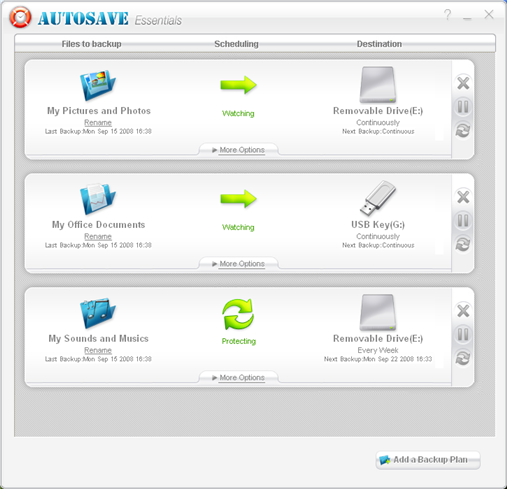
3. Restore it: if disaster does strike, everything backed up is restored with 1 click. 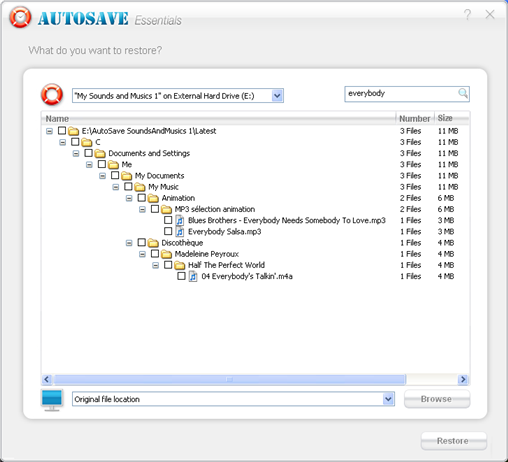
Most people have an anti-virus program to protect them from attacks from the outside world. But what about insurance against human error or a PC that crashes? AutoSave Essentials is the right answer for full data protection.
If your PC is lost, damaged, or stolen, AutoSave can make sure you don’t lose a lifetime of photos, personal emails, legal documents, and other important files.
| Version | 3.5 |